Tools can feel like a wall when you’re new to email marketing. You start out looking for a tech-free email marketing system, but then:
One login here,
A “domain” there,
“Money is in the List” warnings,
and suddenly you’re watching setup videos instead of making progress.
Here’s the good news: you can do a lot of your email marketing setup with almost no tech at all. You can plan your offer, map your first emails, and even start collecting leads in simple ways. Then, when you’re ready to send emails at scale, you pick one basic email tool and keep it moving.
I learned the problems with not having an email list the hard way. Early on, I told myself I didn’t need an email list yet. That choice didn’t save time, it cost time, and I missed commissions because I had no simple way to follow up on prospects.
Key Takeaways (If you are in a hurry)
A “no tech” email marketing setup is mostly planning and permission, not sending emails.
You can outline your welcome emails on paper before you touch any software.
You can collect leads through conversations, events, and a simple paper signup sheet.
Permission matters: tell people what they’ll get, how often, and that they can unsubscribe.
Store contacts safely, and track when and where they opted in.
You’ll still need an email service provider (ESP) to send bulk emails legally and reliably.
Don’t wait too long to start an email list, especially in affiliate marketing.
What “tech-free” can realistically mean for email marketing
When people ask for a tech-free way to start email marketing, they usually mean one of two things:
“I want less setup, less confusion, and fewer tools.”
“I don’t want to touch email software at all.”
The first goal is realistic. The second one, not really.
You can absolutely do low-tech planning and early list building. You can write your message in a notebook. You can test your idea by talking to real people. You can even collect signups offline.
What you can’t do (at least not well) is send ongoing “newsletter style” emails to a growing list with zero tools. Regular inboxes like Gmail or Yahoo aren’t made for bulk sending. You’ll run into sending limits, spam filters, and missing features people expect (like one-click unsubscribe).
And the unsubscribe part is not optional. Even if you’re not trying to be “a big business,” you still need to respect consent and follow basic email rules. An email service provider helps with that because it includes list management, unsubscribe links, and sending infrastructure that protects deliverability.
If you try to run your list from a regular inbox, you’re asking for trouble, low inbox placement, spam complaints, or an account lock.
So the real goal is this: reduce tech until it actually helps you, then use the smallest tool setup that keeps you compliant and consistent.
The parts you can do with pen and paper (and still do them well)
This is the fun part, because it’s where results start. You can do all of the following without touching any marketing software:
Pick a simple niche and offer. Don’t overthink it. Choose one group you can help and one type of product you’ll promote.
Define who you help in plain words. For example: “New moms who want extra income from home” or “Beginners trying to get their first affiliate commission.”
Write your promise. One sentence. No hype. Just the outcome you help with.
Next, map a 3 to 5 email welcome sequence. You’re not writing perfect copy yet. You’re planning the flow. Here’s a simple structure that works:
Email 1: Welcome, what to expect, quick win
Email 2: Your story, why you recommend what you recommend
Email 3: Helpful tip, common mistake to avoid
Email 4: Soft promo with disclosure, who it’s for
Email 5: More value, invite replies, offer a next step
After that, draft 10 subject lines. Think “clear,” not “clever.” You’re aiming for opens, not awards.
Finally, list 8 to 12 weekly newsletter ideas. These can be short: one tip, one tool, one lesson, one mistake, one case study.
This prep work is your shortcut.
Later, when you open an email tool, you won’t freeze. You’ll paste and go.
A low-tech email setup that actually works
Plan, capture permission, then move to a tool
If tools cause you to stall on getting started, use this path instead. It’s beginner-friendly, and it keeps you safe.
First, you plan your offer and your first emails (low-tech). Next, you collect permission in a simple way. Then, you store that info properly so you can import it later. Finally, you move to one email platform when you’re ready to send consistently.
That last step matters because email marketing is not just “having addresses.” It’s follow-up. It’s trust. It’s being able to reach people when social posts flop or accounts get throttled.
Also, as an affiliate marketer, you’re often one reminder away from a commission. Most people don’t buy the first time they hear about something. Email gives you a clean way to stay in touch without begging an algorithm for attention.
Step 1: Write your “email list offer” in one sentence
Your “email list offer” is the reason someone gives you their email. It can be simple. It should be useful. It should match the products you promote.
You don’t need Canva. You don’t need fancy PDFs. A plain checklist or a short email mini-series works fine.
Try this template:
Get [result] in [time] without [pain].
Examples made for beginner affiliate marketers:
“Get your first affiliate commission in 7 days without posting 3 times a day.”
“Get 5 beginner-friendly tools to start affiliate marketing without a website.”
“Get a simple weekly action plan in 10 minutes without feeling lost.”
If you want a quick lead magnet idea that fits almost any niche, use one of these formats:
A “top resources” list (your favorite free tools)
A “mistakes to avoid” cheat sheet
A 5-day email series with one small task per day
Keep it honest. If you promise “7 days,” make it a quick start, not a guarantee.
Step 2: Collect emails the low-tech way, with clear permission
You can start collecting leads without building a website first. The key is consent and clarity.
Here are a few low-tech ways that work well:
In-person conversations: Tell someone what you share, then ask if they want it. If they say yes, have them write their email, or text it to you so you don’t misread handwriting.
Local meetups and small events: If you’re teaching something (even informally), bring a simple signup sheet.
DMs that lead to a signup: You can chat in social DMs, then say, “Want my weekly tips by email?” If they agree, ask for their email address and note the date.
Printed QR code on a card: This is still simple. You can print a basic code that points to a signup form later. You don’t have to build a whole site, just a form.
No matter how you collect it, say this in plain language:
What they’ll receive
How often you’ll email
That they can unsubscribe anytime
Later, when you pick an email platform, you can add double opt-in (where they confirm through a link). It’s a strong best practice, especially as your list grows.
Step 3: Store contacts safely until you import them
Once you start collecting emails offline, you become the “keeper” of private info. Treat it that way.
At minimum, track:
Name (if you have it)
Email address
Date they opted in
Where they opted in (event name, DM, workshop, referral)
What you promised to send
A simple spreadsheet is enough. If you’re avoiding tech, you can start on paper, but don’t stay there long. Paper gets lost. It also gets seen by the wrong eyes.
Keep a clear record of permission. If someone asks, “Why am I on this list?” you should be able to answer in one sentence.
A few basic privacy habits go a long way:
Don’t leave signup sheets unattended. Don’t post photos of your sheet on social media. Don’t share your list with anyone. Use a password on your device and your spreadsheet.
This isn’t about paranoia. It’s about respect, and it protects you if questions come up later.
When you must use a tool, choose the simplest email setup
At some point, the “no tech” approach hits a ceiling. That ceiling is sending consistent emails to more than a handful of people.
When you cross that line, don’t turn it into a month-long project. Choose one email service provider and set up the minimum. Then send your first real email.
This is where a lot of beginners lose momentum. They compare platforms for weeks, redesign forms, and tinker with templates.
Meanwhile, they have no list and no follow-up system.
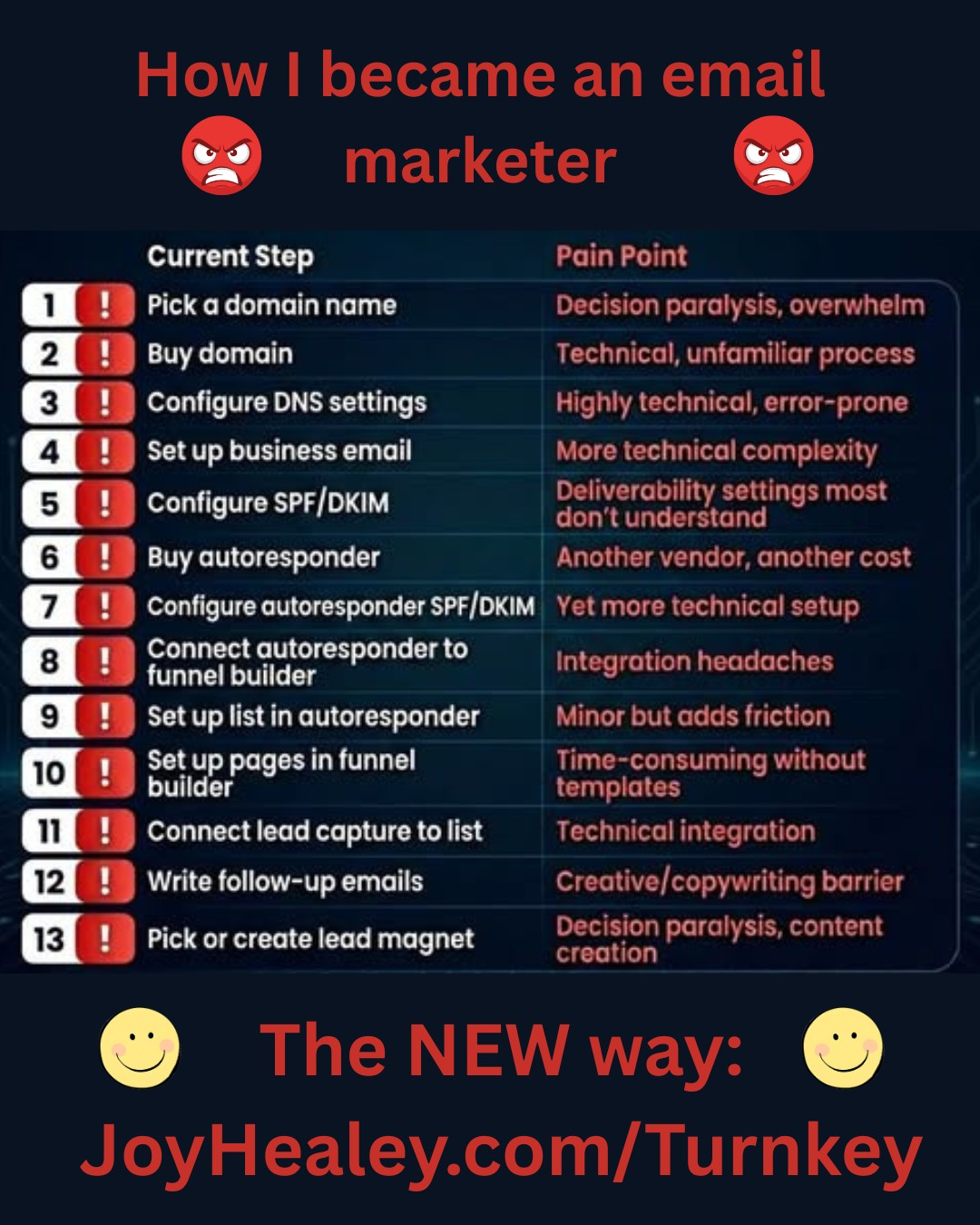
They see the steps you need to follow – on the right – and who can blame them for being put off.
Just a few weeks ago I had occasion to start up with a new auto-responder, and do all the technical setup again. Even though I had been through the steps for another Email Service Provider, doing it all again took me about a fortnight!
I made the mistake of doing it over the Christmas holiday when I knew I would have free time, but what I didn’t take into consideration was that all the support services I needed to contact (hosting, ESP and domain owner) were on a skeleton staff and it was a complete nightmare.
So I’ve been there, and feel your pain.
Waiting feels safe, but it’s expensive. When you don’t have an email list, every visitor who leaves is usually gone for good.
I help small businesses get set up for email marketing
I do this by promoting a training company, and I felt that before I could sell it, I should go though the training myself.
So if I was taking a while to get all the pieced of the puzzle in place, just think how a complete email marketing beginner would feel.
If there was no way to get people started quickly, wouldn’t be keeping my clients long.
Luckily I found a far simpler way to get started with email marketing.
The minimum email marketing setup you need
You only need a few parts to get started:
An email service provider (ESP) that can send bulk email and manage unsubscribes
One list (or audience) to keep it simple
One signup form or basic landing page (many ESPs include this)
One welcome email that delivers what you promised
An unsubscribe link (your ESP adds this)
A plain weekly newsletter you can keep up with (I use this for inspiration)
When you compare tools, focus on these features:
Easy form builder, simple automation (welcome email), tagging or email list segmentation (optional at first), decent support, ability to add emails manually, and a clean editor that doesn’t fight you.
Popular options include MailerLite, Mailchimp, GetResponse, and AWeber. Pick the one that feels easiest, not the one with the most features. If you’d like everything (list pages, opt-ins, and follow-up) in one free dashboard, our LeadsLeap Free vs Pro review is a good place to compare. BEWARE: Some auto-responders don’t allow you to include affiliate offers – check first. I use GetResponse and AWeber and have never had problems with affiliate offers. But policies may sometimes change, so be sure to check.
A quick import and first-send checklist for beginners
Although I have my full email and auto-responder system set up the ‘long way’, for beginners to email marketing, I use this done-for-you email set-up to get people up-and-running in 15 minutes. The collected leads can be downloaded onto a spreadsheet and then imported into a stand-alone auto-responder when you have connected all the moving parts together. (There is full training and support available for that in the ‘Academy’ section inside the training site I recommend and use.
Use this short checklist to go from “contacts collected” to “first email sent” without spiraling.
Clean your spreadsheet (one person per row, no extra notes in the email field).
Confirm you have permission for everyone listed.
Import contacts into your ESP, and keep your opt-in notes for your own records.
If permission is unclear for any contacts, don’t import them. Or send a one-time “Do you still want this?” email (then remove non-responders).
Write a simple first email: quick hello, what you’ll send, one helpful tip, and a reply question.
Add your affiliate disclosure when you promote (clear and near the link).
Schedule your next email now, even if it’s short.
Small and steady wins here. A “good enough” first email beats a perfect email you never send.
FAQs about tech-free email marketing setup
Can I start with a notebook and add people later?
Yes, you can. Get clear permission, and write down when and where they opted in. Then move them into a proper email tool sooner rather than later. The longer you wait, the more likely you’ll lose entries, forget context, or stop following up.
Can I use Gmail or Yahoo to email my list?
Not for a real list. Those inboxes are meant for one-to-one and small group messages. You’ll hit sending limits, risk spam complaints, and you won’t have clean unsubscribe management. Once you’re emailing more than a few people, use an email service provider.
Do I need a website to start email marketing?
No. A website helps, but it’s not required at the start. Many email platforms give you a simple landing page and signup form. You can also collect emails offline, then add a form later. Owning your email list matters more than owning a fancy site in month one. My Turnkey system sets you up with a personalised domain and you won’t have to pay extra for a secured site.
Conclusion
A tech-free start is possible, as long as you define “tech-free” the right way. Plan your offer on paper, map your welcome emails, collect permission in simple ways, and store contacts safely. Then choose one basic email tool and send your first message, even if it’s plain. Waiting to build an email list can cost you time and commissions, so take one step today, and keep it easy. If you want a simple next move, join my free side-hustle tips list (in the side-bar), or use the DFY Turnkey method and start collecting your first subscribers this week.
Learn how to choose the right niche for your retirement side hustle. Align your passions with market demand to create a sustainable and rewarding online business.
Type to see results. Up and down to move, Enter to open.Esc closes
We use cookies
We use cookies to keep the site working, remember your preferences, understand how it is used and, with your permission, measure our marketing. You choose which.
We use cookies to keep the site working, remember your preferences, understand how it is used and, with your permission, measure our marketing. You choose which.